Moving to Odoo shouldn't mean losing your history
Whether you're leaving another system for Odoo, or moving from an old Odoo to a current one.
Migration is about one thing: getting there without losing data, breaking customization,
or stopping the business while it happens.
—= Who this is for =—

Leaving another system
Running your business on Tally, QuickBooks, Excel, or another system, and ready to move to Odoo without losing years of records

Falling behind on Odoo
On an old Odoo version that's falling behind, missing features, no more security updates, harder to find support for

Inherited an old instance
Inherited an Odoo instance that was never upgraded and is now too far behind to patch incrementally
Moving hosting, not data
Moving your Odoo instance to new hosting without changing the version, a server migration, not a data one
Where migration differs from implementation
Implementation is building an Odoo setup from a blank slate, configuring modules around your processes.
Migration starts from data and configuration that already exist somewhere else, and the job is carrying it across accurately, not starting over.
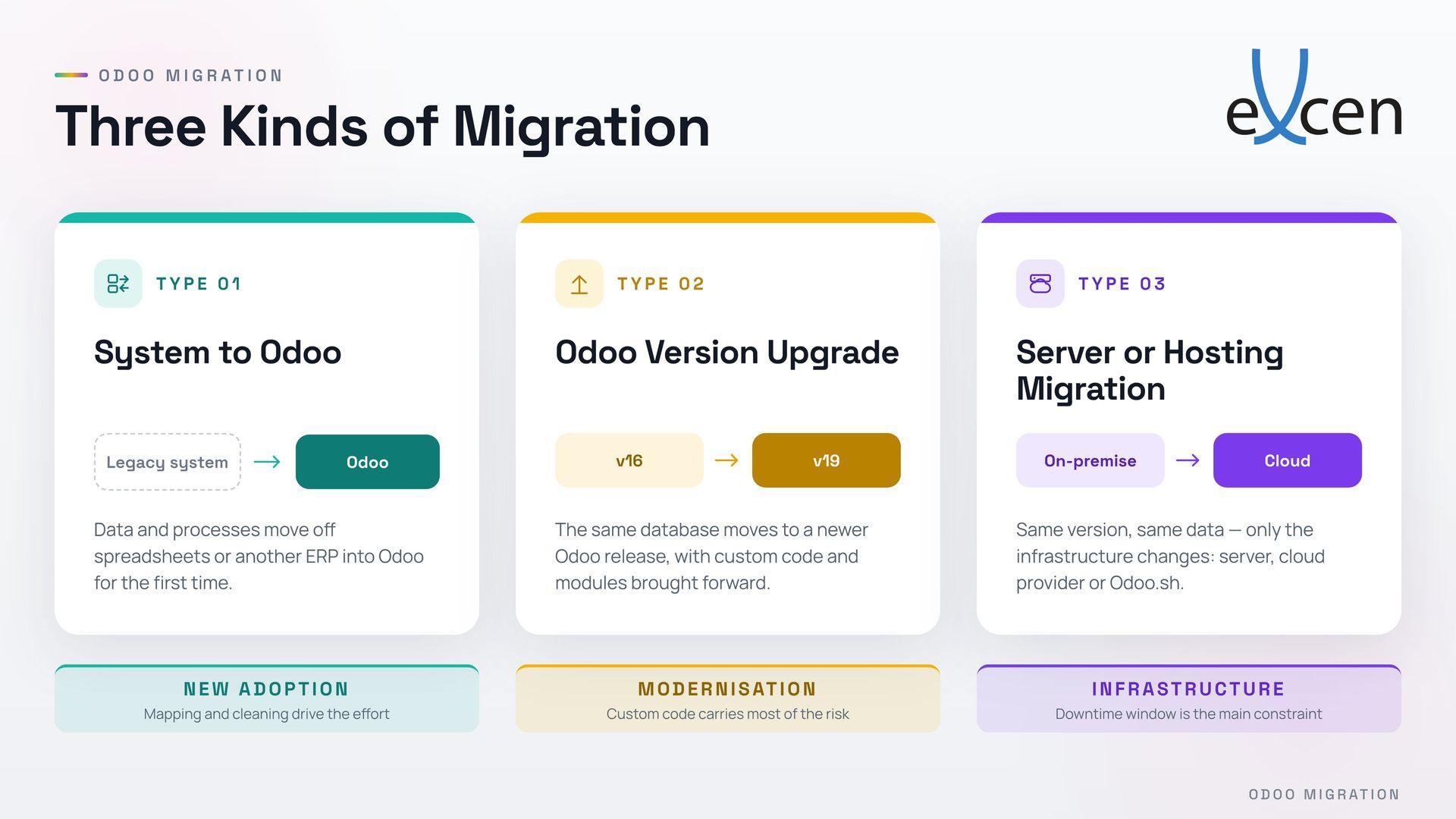
We'll tell you which one you actually need before quoting anything, they carry very different scope and risk.
—= What we look at before we quote anything =—

Data volume & complexity
How many records, how many years of history, how connected they are, a customer list migrates differently than a customer list tied to years of linked invoices and stock movements.

Backup first, always
A full backup is taken before anything is touched.
Your original data stays recoverable no matter what happens during migration.

Current system & version
The gap between where you are and where you're going shapes the whole plan, one-version Odoo upgrade is a different job from a ten-year-old Excel archive.

Custom modules & integration
Anything built specifically for your old setup needs to be reviewed and rebuilt, not just copied, it usually doesn't survive a straight data transfer.

Expected downtime
We give you a real estimate up front and work to keep it short, not a vague promise of "zero disruption" that doesn't hold up on the day.
—= How we run a migration =—
Audit the current system
Review your existing data, modules, and configuration before touching anything, this is where the real scope gets defined.
Back up everything
A full backup, taken and verified, before any migration work starts.
Migrate data and configuration
Records, structure, and settings move across, cleaned and checked, not just dumped in.
Rebuild what needs rebuilding
Custom modules and integrations get adapted to work in the new environment, not assumed to carry over automatically.
Test in a staging environment
Every module and workflow is checked against real data before anyone touches the live system.
Go live, with support close by
We stay available immediately after cut-over, this is when small issues surface, and we want to catch them fast.
—= FAQ =—
Not if it's done properly, which is why we back up everything before starting and reconcile the migrated data against the original afterward. Nothing goes live until we've confirmed it matches.
They can, but they usually need review and adjustment, a module built for an old Odoo version rarely runs unchanged on a new one. We check this during the audit, before quoting.
Depends on data volume and complexity, we'll give you a specific estimate after the audit, not a generic promise.
Most single-entity migrations can be scheduled outside business hours to minimize disruption.
Most likely, the list above covers what we see most often, not everything we can handle. Tell us what you're on and we'll assess it.
Usually, yes
You're not starting from a completely different data structure. But the real cost depends on custom modules and how many versions behind you are, which is exactly what the audit is for.
Know what moving to Odoo actually involves before you commit.
Know exactly what you're signing up for, before you sign up.